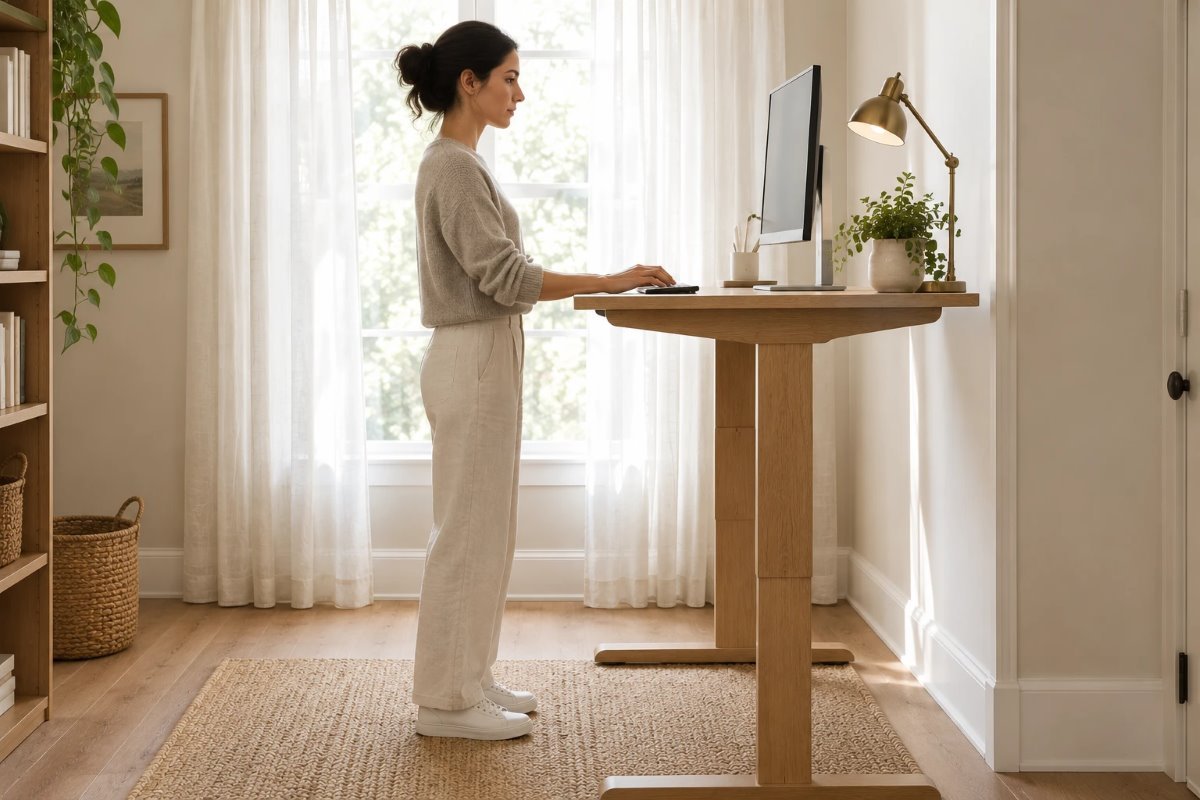
A standing desk is only helpful if it is at the right height. Too low, and you hunch over; too high, and your shoulders creep up toward your ears. The easiest way to set standing desk height is not a chart, it is a quick check: stand up straight, bend your arms so your elbows are near 90 degrees with your wrists straight, and set the desk surface at about that height.
This guide gives you that method, some sourced numbers for reference, how to place the monitor and keyboard once the desk is set, and tips for small spaces and shared desks. It is general ergonomics guidance, not medical advice.
Quick Answer: Standing Desk Height
- Method: stand straight in your usual shoes, bend your elbows to about 90 degrees and set the desk at your forearm height.
- Wrists: keep them straight, not bent up or down.
- Monitor: top of the screen at or just below eye level, about an arm’s length away.
- Chart numbers vary: one source lists about 36 inches for 5 feet tall and about 38 inches for 5 feet 4 inches; another gives a typical range of about 38 to 46 inches.
- Adjust: change by an inch or two after a few days if your shoulders or wrists feel strained.
Why Height Matters
A standing desk lets you change position during the day, but the benefit depends on the setup. When standing desk height is right, your shoulders stay relaxed, your forearms are level and your wrists are neutral. When it is wrong, you can end up with sore shoulders, wrists or back, even though you are standing.
How to Measure Your Elbow Height
Stand straight in the shoes you normally wear at your desk, with your upper arms relaxed at your sides. Bend your elbows to about 90 degrees so your forearms are level with the floor. Ask someone to measure from the floor to the underside of your forearm, near your elbow. That number is the target height for the desk surface, or for the keyboard if it sits on a tray. Because arm length differs from person to person, measuring your own elbow height beats a general chart.
Reference Numbers
Sources do not agree on a single chart, so use these as rough anchor points.
| Source point | Reported number |
|---|---|
| Person about 5 ft tall | About 36 in standing desk surface |
| Person about 5 ft 4 in | About 38 in |
| Broad typical range | About 38 to 46 in |
| Your own elbow height | The most reliable number; measure it |
A formula that multiplies your height by 0.7 to 0.85 gives much higher numbers than these sources, so I did not use it. The rest of the figures are from partial charts, so treat them as ranges and trust your own measurement.
Keyboard and Wrist Position
Place the keyboard and mouse so your elbows stay near your sides and your wrists stay straight. A keyboard tray can help if the desk surface is thick. Float your hands over the keys instead of resting your wrists on the edge of the desk. If you feel your shoulders rising, lower the desk a little.
Monitor Height After You Set the Desk
Once the desk is at the right standing desk height, set the monitor so the top of the screen is at or just below eye level and about an arm’s length away. Many people raise the monitor too little when they stand, so check it again. Our guide to monitor height and distance explains how far the screen should be.
Shoes, Mats and Posture
The shoes you wear change your height, so measure in the same shoes you use. An anti-fatigue mat can make standing more comfortable, and shifting your weight now and then helps. Keep your feet flat, your knees soft and your back neutral, and avoid locking your knees.
Sitting and Standing Heights
If your desk goes up and down, set both heights. For sitting, the same elbow rule applies, with your feet flat on the floor and your knees about level with your hips. Save the two settings on the desk’s memory buttons, if it has them, and switch often. Switching matters more than any single setting.
Lighting and Glare
Standing changes your eye level and your angle to the window, so check for glare on the screen after you set the desk. Place the monitor at a right angle to the window, and add a desk lamp for task light. Our guide to desk lamp height for a home office shows where to place it.
Small Spaces and Closet Offices
In a small room or closet, a compact standing desk or a desktop riser saves space. Choose a desk that fits the width of the wall, and leave room to push the chair away. For layouts, see our closet home office for small spaces and home library office ideas for small spaces.
Shared Desks
If two people share a desk, set a height in the middle and use a monitor arm and a keyboard tray to fine-tune. Some desks have memory presets for each person. The right standing desk height is personal, so each user should check their own elbow height.
Doing This as a Renter
Renters can use a desktop riser or a freestanding standing desk, which needs no drilling. Use felt or rubber feet to protect floors and a cable tray so cords do not drag.
Budget and Timing
A desktop riser costs much less than a full standing desk and can be tested quickly. A full desk costs more but gives you a flexible setup. Setting standing desk height takes about ten minutes.
Where to Start If This Is Your First Time
Measure your elbow height, set the desk, put the monitor at eye level and work for an hour. If your shoulders or wrists feel strained, adjust by an inch. Repeat the check after a few days. This is the easiest way to find your best standing desk height.
Safety
Check the desk’s weight limit and make sure it is stable, route cables so they do not snag when the desk moves, and keep fingers and pets clear when raising or lowering. If you have pain, talk to a professional.
Quick Recap
Stand straight, bend your elbows to about 90 degrees, set the desk at forearm height and put the monitor at eye level. Measuring your own elbow height beats any chart, and it makes standing desk height easy to get right.
Adjusting Over the First Week
Your body will tell you if the setting is off. Sore shoulders usually mean the desk is too high; wrists bent up usually mean it is too low. Change standing desk height by an inch at a time and give each setting a day or two. Write down the number that works so you can reset it after a move or a cleaning.
Common Mistakes to Avoid
- Setting the desk from a chart without checking your elbows.
- Forgetting your shoes.
- Leaving the monitor too low after standing.
- Standing all day. Switch positions.
FAQs
How high should a standing desk be? Set it so your elbows are near 90 degrees.
Is there a standard height? Charts vary; typical ranges are about 38 to 46 inches.
What about short users? Charts list about 36 to 38 inches for 5 feet to 5 feet 4 inches.
Should wrists be straight? Yes, neutral and not bent.
Do I need a mat? It can help comfort, not required.
How often should I switch? Often; switching matters more than the exact setting.
Tools and Basics to Gather
A tape measure, your usual shoes, a helper, a monitor riser or arm, a keyboard tray if needed, an anti-fatigue mat and cable ties.
The Bottom Line
The best standing desk height is the one where your elbows sit near 90 degrees and your wrists stay straight. Measure your own elbow height, set the monitor at eye level, adjust after a few days and switch positions often. That small routine matters more than any chart.
Related:
Desk Lamp Height for a Home Office · Closet Home Office for Small Spaces